'/%3E%3Cpath%20d='m454%20250-4%204-4-4c-3%203-9%205-9%205l2-5q-9%205-10%203c-1-1%2010-12%2012-26%200-1%203-18-8-13-2%201-4-5%200-7%203-2%2010-1%2011%200q1-2%203-2c2%200%2011%201%2014%206%202%205%202%2014%202%2015q0%2015%208%2027c-1%201-8-2-8-2v3s-7-2-9-4m-12-32c4%2014-9%2031-11%2033%2011%200%2012-10%2015-24l1%201c-2%2011-5%2022-8%2025l7-4%203-22h1l-3%2022%203%203%203-3-1-21h1l1%2021%208%203c-5-8-6-25-6-23h1c2%2012%203%2022%2012%2022-3-3-8-16-7-25q0-12-2-15-6-3-10%202-2%202-5-1c-2-2-1-2-6-4q-7-2-6%205s9-3%2013%205zm7-8q-3%201-1%202%203%200%201-2'/%3E%3C/g%3E%3C/svg%3E)
The arrival of native pixel airdrop compatibility via Quick Share is finally breaking down the wall between Android and iOS. In 2026, mobile users are celebrating as seamless direct file transfer between opposing ecosystems becomes standard reality.
For years, cross-platform sharing felt like an impossible dream. Apple locked down AirDrop to its walled garden, while Android relied on Nearby Share, which later evolved into Quick Share. However, recent developments have merged these technologies into a unified experience.
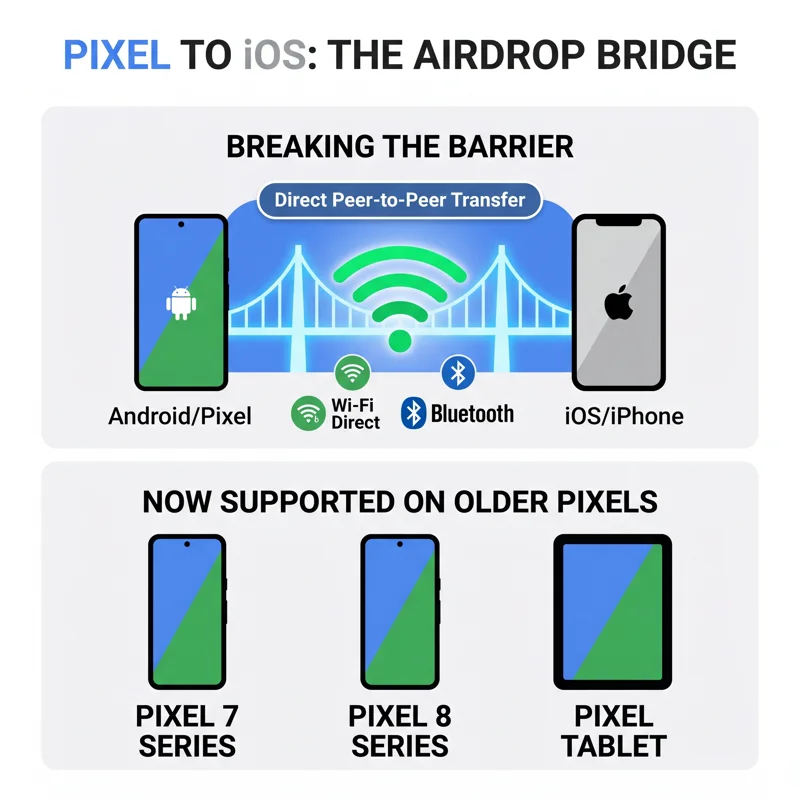
While the feature initially launched on flagship generations like Pixel 10 and Pixel 11, older handsets are now receiving sudden update alerts. Owners of the Pixel 7, Pixel 8, and original Pixel Tablet are reporting direct cross-platform prompts.
The Breakthrough: How Pixel AirDrop Compatibility Works
The modern pixel airdrop functionality works by bridging the underlying local Wi-Fi direct and Bluetooth protocols. Instead of needing third-party cloud apps, devices negotiate direct handshakes.
When an iPhone user opens their standard sharing sheet, your compatible Google device shows up as an eligible nearby target. This protocol bridge enables lightning-fast media transfers without sacrificing file compression or quality.
“Android and iOS devices have been inching closer towards peaceful co-existence with the arrival of cross AirDrop/Quick Share support.”
Google initially rolled out the feature down through the Pixel 8a. Expanding the pixel airdrop tool to older Tensor chips demonstrates Google’s commitment to long-term software support.
| Device Generation | Chipset | AirDrop Support Status |
|---|---|---|
| Pixel 10 & 11 Series | Tensor G5 / G6 | Official & Fully Integrated |
| Pixel 8a, 8 & 8 Pro | Tensor G3 | Active Phased Rollout |
| Pixel 7 Series & Tablet | Tensor G2 | Early Notifications Spotted |
Expanding the Pixel AirDrop Ecosystem to Older Hardware
Users on Telegram and X have shared screenshots of unexpected activation alerts on Pixel 7 hardware. This confirms that backward compatibility does not rely on exclusive, modern radio hardware.
Instead, software updates to Google Play Services handle the handshake negotiations. This allows a broader audience to utilize pixel airdrop features without buying a brand-new device.
For official updates regarding hardware maintenance and software distribution, check the announcements on the Google Pixel Official Blog.
Why Pixel AirDrop Support on Pixel 7 and 8 Matters
Devices that refuse to communicate create friction for everyday users. Ecosystem lock-in has been an intentional strategy across big tech brands for over a decade.
By bringing pixel airdrop sharing to older devices, Google makes family and business interactions frictionless. Sending high-resolution photos or large PDF documents between an iPhone and a Pixel 7 no longer requires cloud storage links.
“Devices that will not play nicely together degrade the user experience; ending artificial barriers benefits everyone.”
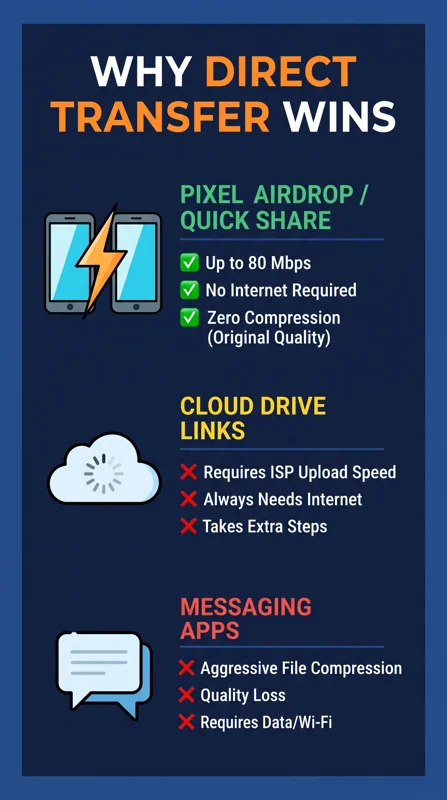
This cross-platform shift also protects media integrity. Unlike messaging platforms that heavily compress videos, direct local sharing preserves full resolution and metadata intact.
| Transfer Method | Transfer Speed | Internet Required? |
|---|---|---|
| Direct Pixel AirDrop | Up to 80 Mbps (Peer-to-Peer) | No (Local Offline Transfer) |
| Cloud Drive Links | Limited by ISP Upload Speed | Yes (Always Required) |
| Messaging Apps | Moderate (Compressed Data) | Yes (Always Required) |
Troubleshooting Pixel AirDrop Notification Glitches
While excitement is high, early adopters have noted slight inconsistencies. Some Pixel 7 owners received the notification, but the actual transfer menu failed to initialize.
This suggests that Google is conducting server-side staged rollouts. The notification flag may activate slightly ahead of the backend Google Play Services library update on your device.
If your device displays the alert, ensure your Bluetooth and Location toggles remain active. A quick device reboot often forces the new pixel airdrop daemon to load properly.
The Future of Pixel AirDrop and Cross-Platform Sharing
Interoperability has become a primary regulatory and consumer focus in 2026. The widespread adoption of pixel airdrop connectivity proves that open standards provide real convenience.
As Google continues optimizing Tensor drivers, tablet and foldable owners will enjoy identical speeds. Unifying Quick Share with AirDrop is a major milestone for mobile computing.
Keep your Pixel up to date through monthly security patches. The seamless pixel airdrop experience will soon be available to every eligible user globally.
Frequently Asked Questions
What is pixel airdrop compatibility?
It is an interoperability feature that allows Google Pixel devices using Quick Share to send and receive files directly with Apple AirDrop users.
Which older Pixel models are getting this support?
User reports indicate that the Pixel 7, Pixel 7 Pro, Pixel 8, Pixel 8 Pro, and the original Pixel Tablet are currently receiving rollout alerts.
Do I need an internet connection to use pixel airdrop?
No. Transfers occur locally over direct peer-to-peer Wi-Fi and Bluetooth connections, so no active cellular data or Wi-Fi network is required.
Why does the notification appear if file transfer is not working yet?
Google is performing a phased, staged rollout. UI notifications may appear before the required background Play Services binaries finish updating.
Does this feature reduce photo or video quality?
No. Direct local transfers maintain original quality without the aggressive compression often applied by social messaging apps.
How do I turn on the feature on my Pixel phone?
Open Settings, navigate to Connected Devices, tap Quick Share, and make sure your device visibility is set to receive files from everyone nearby.
Is pixel airdrop safe to leave enabled?
Yes. You can set visibility to “Contacts only” or set temporary 10-minute discovery windows to prevent unwanted file requests in public spaces.
Disclaimer: This article is for informational purposes only and is based on user reports and staged firmware rollouts. Software availability may vary by carrier, model, and geographic region.