The tech community is buzzing because google now lets you explore the web side by side with ai mode, permanently altering how we interact with digital information. In 2026, the days of drowning in a sea of browser tabs are officially over. Google has taken its conversational search capabilities and integrated them directly into the browsing interface.
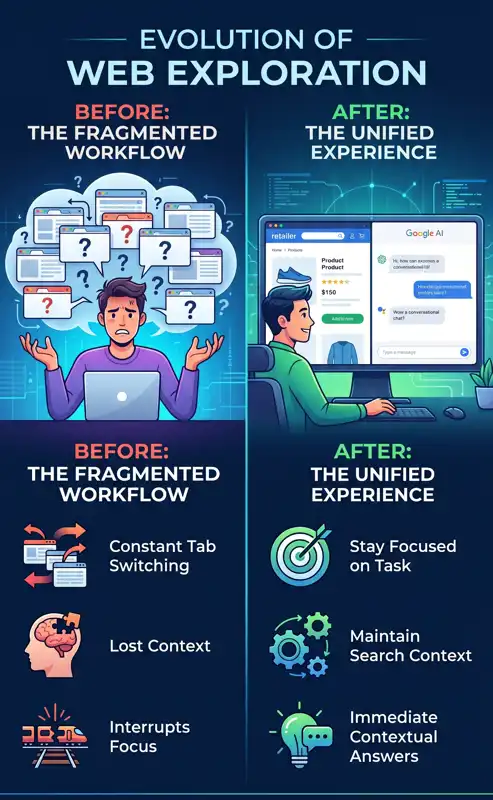
This major update addresses one of the most common pain points for internet users: context switching. Previously, researching a complex topic meant constantly bouncing back and forth between a search engine page and various source websites. This tedious process disrupted workflow and made it difficult to synthesize information.
Now, Google is introducing a seamless solution for Chrome desktop users. By clicking a link within the AI search interface, the resulting webpage opens right next to the chat window. This creates a powerful, unified workspace where you can read, analyze, and ask follow-up questions without ever losing your place.
Transforming the Google Conversational Search Experience
The core goal of this update is to streamline digital exploration. The tech giant wants to make it incredibly easy for users to compare details, dive deep into relevant websites, and maintain the overarching context of their initial query. This marks a massive leap forward for the Google conversational search experience.
Imagine you are trying to purchase a complex appliance, like a high-end espresso machine. In the past, you would search, click a link, read a review, realize you have a question about cleaning it, and then open a new tab to search for that specific detail. It was a fragmented and frustrating process.
With the new Side-by-side AI Mode, the workflow is entirely different. You simply describe what you are looking for in the AI chat. When the AI suggests a few options, you click on one. The retailer’s website or the product review instantly opens alongside the AI panel.
While looking at the product page, you can ask the AI highly specific questions. For instance, you can type, “How easy is this specific model to clean?” or “Does this come with a warranty in my state?” The AI Mode will use the context from the page you are currently viewing, combined with its vast knowledge from across the web, to give you a precise answer immediately.
Our early testers loved that they didn’t have to constantly switch tabs to get help with a comprehensive article or a long video. Having both Search and the web side-by-side helped them stay focused on their tasks.
This contextual awareness is what makes the feature so revolutionary. It acts as a personal shopping assistant, a research partner, and a study buddy, all housed within a single browser window. You are no longer just searching the web; you are actively having a dialogue with it.
| Browsing Feature | Traditional Browsing | New Side-by-Side AI Mode |
|---|---|---|
| Workflow | Open multiple tabs, switch continuously. | Single view, side-by-side interaction. |
| Context Retention | Easily lost when moving between pages. | AI remembers the entire session history. |
| Follow-up Questions | Requires a brand new search query. | Ask directly about the visible page content. |
Mastering Contextual AI Web Browsing
Beyond simply putting a chat box next to a webpage, Google has introduced advanced Chrome desktop AI features that allow the browser to understand what you are actively looking at. This is the foundation of true Contextual AI web browsing.
The AI does not just read the text on the page; it understands the structure, the imagery, and the intent behind the content. If you are looking at a complex chart on a financial website, you can ask the AI to summarize the data points or explain what a specific trendline means.
This is particularly useful for long-form content. If you land on a 5,000-word article about quantum physics, you don’t have to read the entire thing to find a single fact. You can keep the article open on the left, and ask the AI on the right to “Summarize the main argument of this author” or “Find the section where they discuss string theory.”
The AI highlights the relevant information, pulling quotes directly from the adjacent page while simultaneously cross-referencing it with its broader knowledge base to ensure accuracy. It saves an immense amount of time and mental energy.
The Power to Search Across Open Tabs
Perhaps the most requested feature that Google is finally delivering is the ability to search across open tabs. For users who habitually keep dozens of tabs open for research, this is a game-changer.
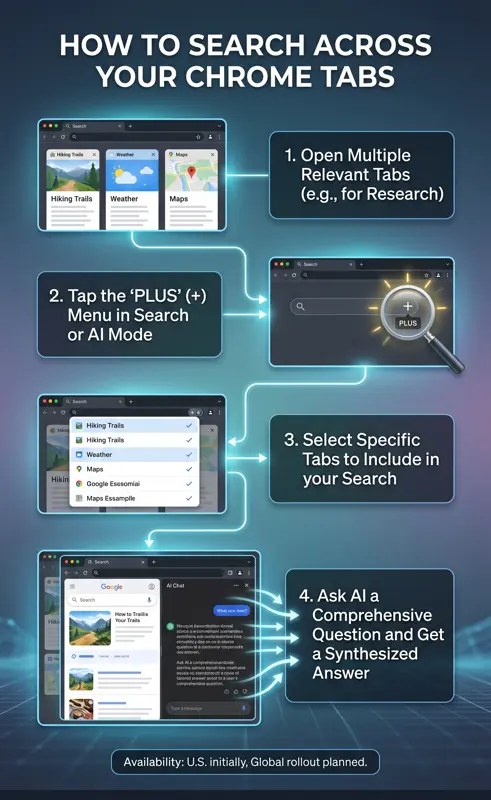
Google has integrated a new “plus” menu directly into the search box on the Chrome “New Tab” page, as well as within the AI Mode interface itself. By tapping this plus icon, you can select specific recent or currently open tabs to include as the foundation for your next search.
This means you are no longer limited to searching the general internet. You can essentially build a custom, temporary database out of the tabs you have curated. You can mix and match multiple tabs, images, or PDF files, bringing all of that combined context directly into your AI Mode queries.
| User Profile | Use Case Example | How the Plus Menu Helps |
|---|---|---|
| Students | Studying for a statistics exam. | Combine lecture slides, digital notes, and Wikipedia tabs to ask for customized practice problems. |
| Shoppers | Buying a new laptop. | Select three different retailer tabs and ask the AI to build a comparison table of specs and prices. |
| Travelers | Planning a vacation itinerary. | Group flight tabs, hotel tabs, and local blog tabs to generate an optimized daily schedule. |
For example, if you are researching local hiking trails, you might already have four or five different park websites open. Instead of reading each one individually, you can add them all to your search via the plus menu. Then, you can ask the AI, “Based on these open tabs, which trail is best for dogs and under three miles?”
The AI will scan the content of only those selected tabs, synthesize the information, and deliver a perfectly tailored answer. It completely removes the friction of manual data aggregation.
Availability and the Future of Chrome Desktop AI Features
The rollout of these features is a clear signal that Google is transitioning Chrome from a simple document viewer into an intelligent, proactive workspace. The browser is no longer just a window to the web; it is an active participant in your research.
Currently, the new updates to AI Mode, including the side-by-side view and the cross-tab search functionality, are rolling out and are now available to users in the United States. Google has explicitly stated plans to expand these capabilities to additional regions and languages in the near future.
To ensure you have access to these tools, make sure your Chrome browser is updated to the latest version. You may also need to opt into experimental features if they are still being tested in your specific geographic area. For the most accurate and up-to-date information on feature rollouts, you can always check Google’s official Chrome blog.
| Feature Status | Details |
|---|---|
| Current Availability | United States (Desktop & Mobile) |
| Platform Requirement | Latest version of Google Chrome |
| Future Plans | Global expansion to additional regions |
As we move further into 2026, we can expect these tools to become even more deeply integrated into our daily workflows. The ability to converse with your browser, to have it read, summarize, and compare the pages you are looking at, fundamentally changes the speed at which we can process information.
Stop wasting time digging through a mess of cluttered tabs. Embrace the new side-by-side AI Mode and let Chrome do the heavy lifting for your next big research project, shopping spree, or study session.
Frequently Asked Questions
What exactly is Google’s new Side-by-Side AI Mode?
It is a new feature in Google Chrome that allows you to click a search link and have the resulting webpage open immediately next to the AI conversational chat box, preventing the need to switch tabs.
Can the AI read the webpage I am currently looking at?
Yes. When you use Side-by-Side AI Mode, you can ask the AI specific questions about the content on the webpage you are viewing, and it will use that context to formulate its answer.
How do I search across my open tabs in Chrome?
You can click the new “plus” menu in the Chrome search box or within the AI interface to select specific open tabs, recent tabs, or files, and include them as context for your AI query.
Is this feature available on mobile devices as well?
The Side-by-Side view is primarily optimized for Chrome desktop due to screen real estate, but the ability to search across recent tabs via the “plus” menu is rolling out to both desktop and mobile versions of Chrome.
Do I need a special extension to use this feature?
No, this is being built directly into the core Google Chrome browser. You simply need to ensure your browser is updated to the latest version to access these new AI features.
Is the Side-by-Side AI Mode available globally?
Currently, the new updates are available to users in the United States, with Google planning to expand access to additional regions and languages in the future.
Can I use this feature to compare products from different websites?
Absolutely. By using the tab-selection feature, you can highlight several different retailer tabs and ask the AI to compare the prices, specifications, and reviews of the products across those open pages.
Disclaimer: This article is for informational purposes only. Features, rollout timelines, and availability of Google Chrome’s AI Mode are subject to change based on official updates and regional deployments by Google.