If you are looking to hide YouTube Shorts, you are in the right place. In 2026, the digital landscape is heavily focused on short-form content, making it easier than ever to lose hours to mindless swiping.
Thankfully, the platform has finally listened to overwhelming user feedback. You can now take full control over your viewing experience directly from your smartphone.
The addictive nature of bite-sized videos can severely impact daily productivity. Many users have expressed frustration over the inability to clean up their feed.
Previously, the platform only allowed users to set a 15-minute timer before receiving a break reminder. Now, the highly anticipated zero-minute limit is available to everyone.
Implementing a YouTube Shorts feed limit helps mitigate the effects of continuous scrolling. This update is a game-changer for anyone trying to regain their focus.
“Reclaiming your digital well-being starts with controlling your feed, not letting the algorithmic feed control you.”
Why You Might Want to Disable Short-Form Videos
Social media platforms have aggressively pushed short, vertical videos to compete in the fast-paced digital market.
While entertaining, these quick clips are purposely designed to keep you scrolling infinitely.
This continuous loop triggers dopamine releases that make it incredibly hard to look away and put the phone down.
Parents and adults alike are now actively seeking better YouTube time management settings.
Maintaining a healthier relationship with our screens is vital for mental clarity and overall productivity.
| Feature Aspect | Previous Setting (2025) | New Update (2026) |
|---|---|---|
| Minimum Time Limit | 15 Minutes | 0 Minutes (Complete Block) |
| Target Audience | Parental Controls Only | All Global Users |
| Result of Limit | Break Reminder Pop-up | Feed Scrolling Paused |
How to Remove YouTube Shorts from Your Feed
The process to stop doomscrolling on YouTube is quite straightforward.
It only takes a few taps on your mobile device to adjust your viewing preferences permanently.
Ensure you have the latest version of the application installed from your respective app store to access these updated features.
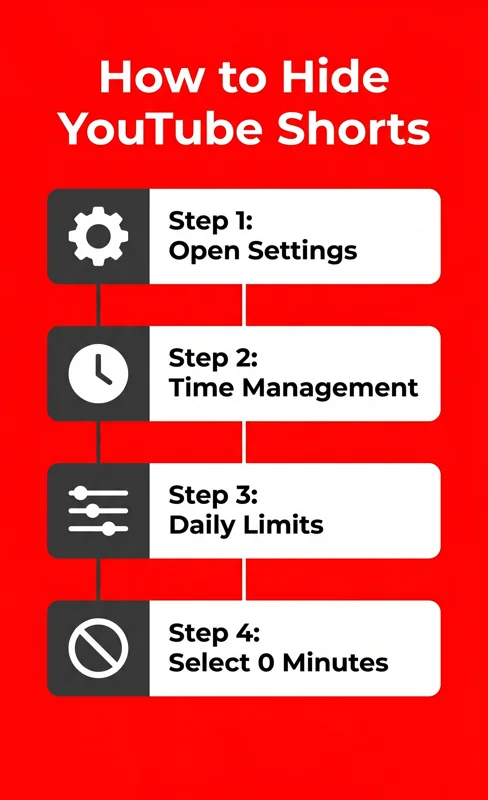
Step 1: Access Your Account Settings
Open the app on your mobile device. Ensure you are logged into your primary account.
Tap on your profile picture located in the corner of the screen to open the main dashboard.
From the dropdown menu, select the “Settings” gear icon to open your preferences.
Step 2: Navigate to Time Management
Scroll through the settings menu until you find the “Time management” section.
This area houses various analytical tools designed to help you track and limit your application usage.
It is highly recommended to review your overall screen time statistics while you are in this menu.
Step 3: Set Your Daily Limits
Look for the subsection clearly labeled “Daily limits.”
Here, you will find the dedicated “Shorts feed limit” option that controls your viewing thresholds.
Tap on this setting to view the available timer intervals in a popup menu.
Step 4: Choose the Zero-Minute Option
Select the newly introduced zero-minute option to enforce a strict block.
A confirmation notice will appear stating: “Scrolling is paused but you may still see individual Shorts.”
You may need to manually refresh your homepage or completely restart the app for the changes to fully take effect.
“Setting boundaries with our digital devices is the ultimate modern life hack for sustained focus and success.”
Other YouTube Time Management Settings
If you do not want to remove YouTube Shorts completely, the platform offers flexible alternatives.
You can easily adjust the timer to suit your daily schedule and personal discipline levels.
This ensures you still enjoy trending content without going overboard and losing track of your day.
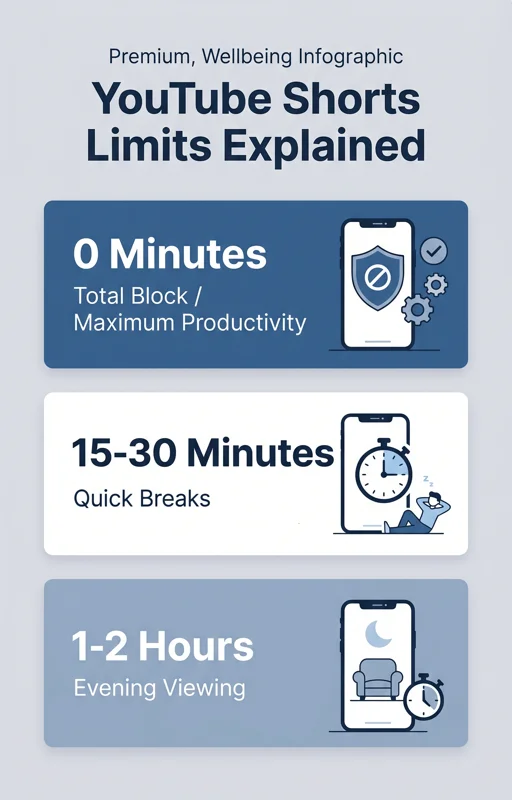
| Timer Option | Best Used For |
|---|---|
| 0 Minutes | Total elimination of the scrolling feed and maximum productivity. |
| 15 – 30 Minutes | Quick entertainment breaks during lunch or commuting. |
| 1 – 2 Hours | Relaxed evening viewing with a definitive hard stop. |
For more detailed information on maximizing your digital wellbeing, you can read the official guidelines provided by the Google Help Center.
The Role of Parental Controls in App Usage
Earlier this year, the zero-minute limit was exclusively tested for linked family accounts.
Guardians utilized these powerful tools to protect younger viewers from excessive and unmonitored screen time.
Now that the feature is universally available, users of all ages can benefit from strict self-regulation.
This shift represents a significant step towards responsible tech consumption championed by major tech corporations.
Content creators and marketers must also adapt to this changing landscape where users are actively limiting short-form consumption.
Will Short-Form Videos Disappear Completely?
It is important to manage expectations regarding this new feature and how the interface operates.
While setting the limit to zero stops the endless feed, it does not erase the format from the platform entirely.
You may still encounter individual short videos embedded in regular search results.
They might also appear on specific channel pages if a creator uploads them.
However, the primary culprit of wasted time—the algorithmic, infinite vertical scroll—is effectively neutralized.
By taking advantage of these updates, you empower yourself to consume media intentionally rather than passively.
Frequently Asked Questions
How do I hide YouTube Shorts completely?
Go to Settings > Time management > Daily limits > Shorts feed limit, and select the zero-minute option.
Can I still watch them if the limit is set to zero?
Yes, you can still click on individual short videos found in search, but the continuous scrolling feed mechanism will be paused.
Is this feature available on the desktop browser version?
Currently, the time limit feature is primarily focused on the mobile application where doomscrolling behavior is most prevalent.
Why did the platform finally add this zero-minute feature?
It was introduced following user feedback to enhance digital wellbeing and give users better tools to manage their daily screen time.
Do I need a premium subscription to use this setting?
No, the zero-minute limit is a free time management tool available to all standard users globally.
What happens if I reach
minute limit instead of selecting zero?
Answer: If you set a 15-minute limit, you will receive a pop-up reminder to take a break once the allocated time expires.
Do I need to restart the app after applying the new setting?
Yes, refreshing the feed or completely restarting the app ensures the changes take effect and removes the dedicated vertical feed.
Disclaimer: This article is for informational purposes only. The features described may vary depending on specific application versions and regional rollout timelines.