

'/%3E%3Cpath%20d='m454%20250-4%204-4-4c-3%203-9%205-9%205l2-5q-9%205-10%203c-1-1%2010-12%2012-26%200-1%203-18-8-13-2%201-4-5%200-7%203-2%2010-1%2011%200q1-2%203-2c2%200%2011%201%2014%206%202%205%202%2014%202%2015q0%2015%208%2027c-1%201-8-2-8-2v3s-7-2-9-4m-12-32c4%2014-9%2031-11%2033%2011%200%2012-10%2015-24l1%201c-2%2011-5%2022-8%2025l7-4%203-22h1l-3%2022%203%203%203-3-1-21h1l1%2021%208%203c-5-8-6-25-6-23h1c2%2012%203%2022%2012%2022-3-3-8-16-7-25q0-12-2-15-6-3-10%202-2%202-5-1c-2-2-1-2-6-4q-7-2-6%205s9-3%2013%205zm7-8q-3%201-1%202%203%200%201-2'/%3E%3C/g%3E%3C/svg%3E)
Should Tesla Introduce UI Themes is the question dominating the electric vehicle community as drivers demand deeper personalization. Over the years, EV owners have customized their vehicles with custom wraps, custom lock sounds, and personalized license plate graphics on the screen. However, expanding this customization directly into the infotainment interface is the logical evolution of the digital cockpit.
Personalization has evolved from a fun gimmick into a core feature of the ownership experience. In 2026, electric car cockpits are defined entirely by their large touchscreen displays. When asking whether Should Tesla Introduce UI Themes, looking at the underlying software architecture reveals just how practical and exciting this feature would be.
The Technical Case: Why Should Tesla Introduce UI Themes Across the Fleet?
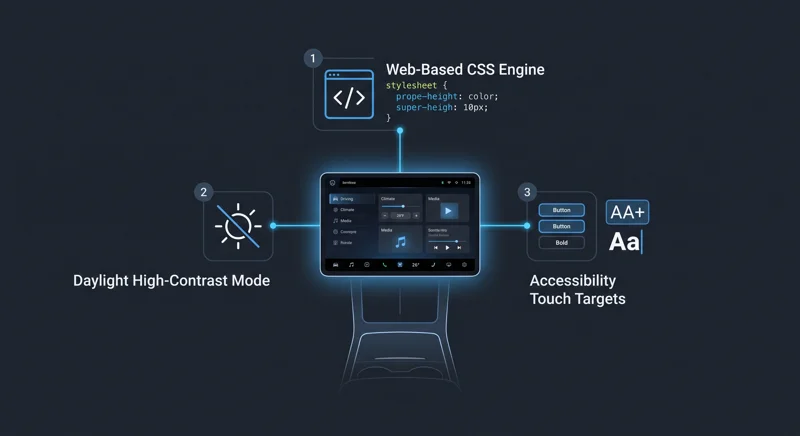
Under the hood, the Tesla infotainment system customization framework is already well-suited for visual styling. The core system runs on a tailored Linux-based operating system. Many native applications—such as the Dashcam Viewer, music player, energy consumption graphs, and FSD visualization overlays—rely heavily on standard web technologies like HTML, CSS, and JavaScript.
Because these applications utilize standard web stylesheets, implementing custom vehicle UI skins could be as straightforward as swapping CSS files. Instead of rewriting complex underlying software code, an over-the-air update could provide an intuitive theme switcher right inside the Toybox or Display settings menu.
“A vehicle interface should not remain rigid. Allowing drivers to choose aesthetic and functional themes brings the smartphone personalization revolution directly to the dashboard.”
The concept of software theming allows users to transform the default layout into a neon Cyberpunk aesthetic, an ultra-minimalist dark mode, or an earthy organic theme. Drivers could easily adapt their screen to match their car’s interior wrap or personal mood.
| Theme Style | Visual Characteristics | Ideal Driving Scenario |
|---|---|---|
| Cyberpunk Neon | Vibrant cyan and magenta accents, sharp geometry | Night cruising and urban drives |
| Minimalist Stealth | Monochrome icons, subdued gray palette, zero clutter | Long highway road trips and distraction-free commutes |
| Earthy Organic | Soft greens, warm wood tones, rounded edges | Daytime scenic country driving and leisure trips |
Real-World Benefits: When Should Tesla Introduce UI Themes for Better Usability?
Beyond pure visual style, answering Should Tesla Introduce UI Themes involves significant functional advantages. A custom theme is not just about cool colors; it can drastically enhance daily driving safety and screen readability under diverse lighting conditions.
For example, high-contrast skins can eliminate distracting sun glare during bright summer road trips. When direct sunlight hits the central display, high-contrast elements ensure critical speed and navigation indicators remain crystal clear.
Furthermore, implementing advanced Tesla touchscreen accessibility features is a massive benefit for many drivers. Accessibility-focused themes can feature larger touch targets, bolder typography, and streamlined menu layouts, making navigation much easier and safer on the move.
To explore official vehicle software capabilities and existing dashboard tools, visit the official Tesla website to see how current display settings are configured across models.
From Cybertruck to Model 3: How Should Tesla Introduce UI Themes to Unify the Lineup?
Another major reason why Should Tesla Introduce UI Themes is the growing diversity of hardware across models. The Cybertruck introduced an angular, futuristic geometric interface that received widespread praise from automotive designers.
Enabling a Cybertruck interface on Model 3 or Model Y vehicles through a software toggle would give existing owners a brand-new experience without buying new hardware. This approach would make older vehicles feel modern and fresh long after delivery.
| Feature Aspect | Default Standard Interface | Custom Themed Interface |
|---|---|---|
| Visual Customization | Fixed Light and Dark modes only | Multi-style presets (Cyberpunk, Retro, Minimalist) |
| Accessibility Options | Standard font scaling | High-contrast mode, enlarged touch zones |
| Cross-Fleet Portability | Model-specific fixed layouts | Cybertruck geometric skin available across all models |
“Software updates keep modern vehicles timeless. Giving drivers full control over their visual interface is the ultimate expression of connected automotive technology.”
Ultimately, the discussion around Should Tesla Introduce UI Themes shows a clear desire for deeper Tesla software update personalization. As infotainment systems become the centerpiece of the modern cabin, offering rich, accessible, and exciting themes is the natural next milestone for connected vehicles.
Frequently Asked Questions
What are the main benefits if Should Tesla Introduce UI Themes becomes a reality?
It would allow owners to personalize their vehicle’s interior aesthetic while improving safety through high-contrast and accessibility-focused visual layouts.
How technically feasible is it to add custom UI skins to modern vehicles?
Highly feasible. Because many native dashboard apps run on standard web-based HTML and CSS over a customized Linux OS, changing visual styles can be achieved by updating stylesheets.
Could Model 3 or Model Y owners get the Cybertruck interface design?
Yes, if customizable UI themes are released, the distinctive angular Cybertruck interface could easily be offered as a selectable theme across other models.
Would custom interface themes cause distractions while driving?
Properly designed themes prioritize legibility and safety, offering high-contrast visuals and larger buttons that actually reduce driver distraction.
Where would a theme selector likely be located inside the vehicle software?
It would most likely be placed within the Display settings menu or integrated into the Toybox section alongside other personalization tools.
What existing personalization features do owners already have access to?
Drivers can currently customize lock chime audio files, apply custom vehicle wrap colors on the digital car model, and customize digital license plates.
Can accessibility themes help drivers with visual impairments?
Yes, accessibility themes provide bolder fonts, higher contrast color palettes, and enlarged touch buttons to make on-the-fly interaction much simpler and safer.
Disclaimer: This article is for informational purposes only. The software concepts, interface themes, and potential features discussed are based on design concepts and technical analysis, and are subject to official confirmation and updates from vehicle manufacturers.

