

'/%3E%3Cpath%20d='m454%20250-4%204-4-4c-3%203-9%205-9%205l2-5q-9%205-10%203c-1-1%2010-12%2012-26%200-1%203-18-8-13-2%201-4-5%200-7%203-2%2010-1%2011%200q1-2%203-2c2%200%2011%201%2014%206%202%205%202%2014%202%2015q0%2015%208%2027c-1%201-8-2-8-2v3s-7-2-9-4m-12-32c4%2014-9%2031-11%2033%2011%200%2012-10%2015-24l1%201c-2%2011-5%2022-8%2025l7-4%203-22h1l-3%2022%203%203%203-3-1-21h1l1%2021%208%203c-5-8-6-25-6-23h1c2%2012%203%2022%2012%2022-3-3-8-16-7-25q0-12-2-15-6-3-10%202-2%202-5-1c-2-2-1-2-6-4q-7-2-6%205s9-3%2013%205zm7-8q-3%201-1%202%203%200%201-2'/%3E%3C/g%3E%3C/svg%3E)
A serious security warning regarding meccha chameleon steam workshop malware has surfaced for PC gamers downloading custom community maps. As one of the biggest indie hits of 2026, the game itself remains safe, but rogue actors are exploiting the Steam Workshop to drop malicious scripts onto unsuspecting players’ systems.
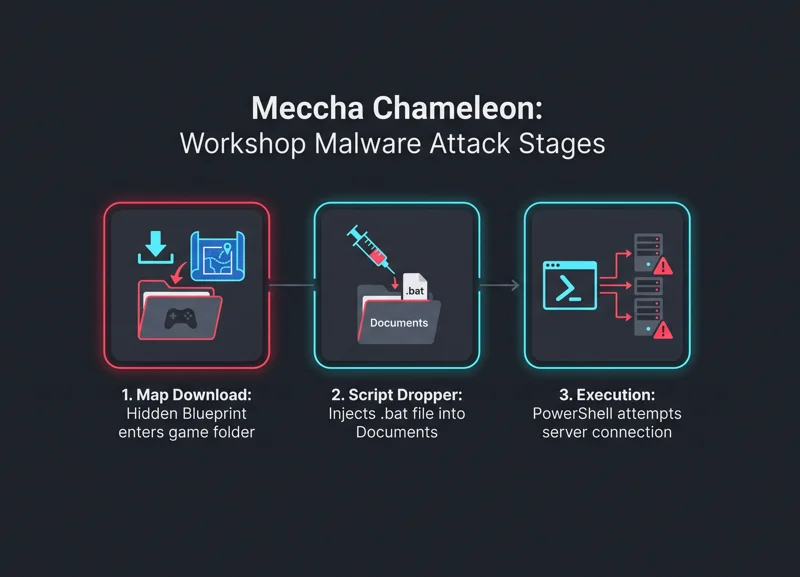
If you have recently joined custom lobbies or downloaded community-created maps, you need to inspect your computer immediately. Security researchers discovered that certain user-created Workshop files contain hidden scripts designed to run silently during map loading screens.
Understanding the Meccha Chameleon Steam Workshop Malware Discovery
The discovery of the meccha chameleon steam workshop malware came after players noticed command prompt windows briefly flashing while downloading custom maps. Security researcher Feint investigated these reports and uncovered a sophisticated exploit hidden inside seemingly innocent map assets.
Although the custom map files appeared normal on the surface using Unreal Engine 5 asset containers, deeper metadata revealed an abnormal Blueprint actor. Designed to impersonate an ambient controller, this actor automatically executes the moment the map loads in the game.
| Attack Stage | Technical Mechanism | System Impact |
|---|---|---|
| 1. Map Download | Automatic download when entering custom lobbies | Malicious Blueprint file enters game folder |
| 2. Script Dropper | Blueprint triggers hidden command prompt window | Injects batch (.bat) file into user’s Documents folder |
| 3. Execution | Launches PowerShell process bypassing execution policies | Attempts remote payload retrieval from external server |
How the Meccha Chameleon Steam Workshop Malware Infiltrates PCs
Once triggered, the rogue Blueprint drops a batch file into the user’s Windows Documents folder. This file launches a hidden PowerShell process that attempts to contact a remote server to download secondary malicious payloads.
While testing indicated that the secondary payload download failed in some instances, any game map writing executable scripts outside designated folders poses a critical threat. This clear violation of user security highlights ongoing risks across user-generated content platforms.
The game itself is 100% safe and virus-free. This incident was strictly limited to custom workshop uploads and an isolated Discord breach.
Developer Statement and Official Discord Hijack
The developers of Meccha Chameleon quickly addressed the situation to reassure the community. They clarified that the core game files are completely secure and uncompromised. However, the situation was complicated when an admin’s Discord account was breached via 2FA bypass, leading to staff being temporarily locked out of their community server.
Players are strongly urged not to click any links or follow instructions posted on the compromised Discord server. The development team has reformatted the affected test machines and is working closely with platform moderators to clean up malicious Workshop listings.
| Security Indicator | Safe Content | Suspicious Content (Red Flag) |
|---|---|---|
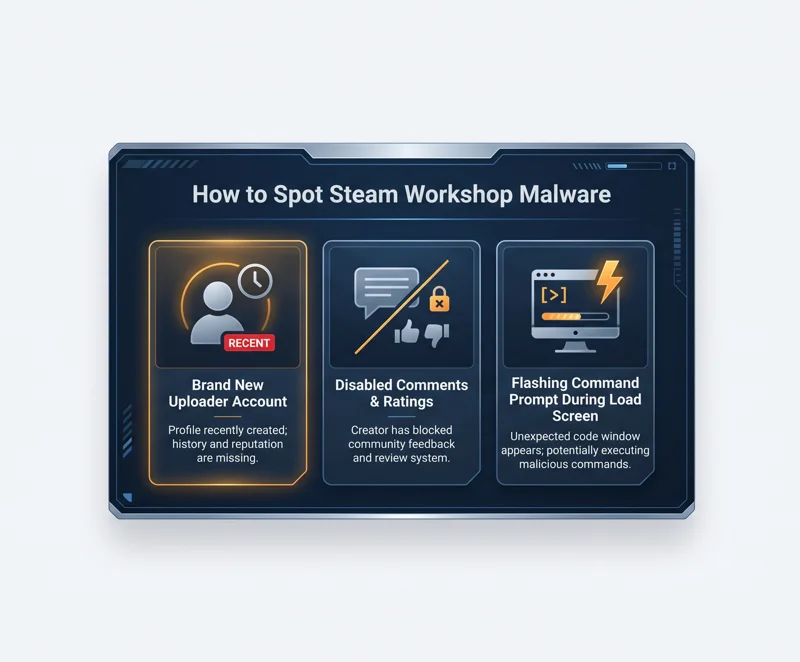
| Uploader Account | Established Steam profile with history | Brand new account (e.g., 1 week old) |
| Community Feedback | Active comment section with user reviews | Disabled comments and hidden ratings |
| System Behavior | Normal loading screens without pop-ups | Flashing command prompt window during load |
How to Protect Your PC from Meccha Chameleon Steam Workshop Malware
To keep your system protected from the meccha chameleon steam workshop malware, avoid downloading unverified custom maps until Valve cleans the Workshop library. Pay close attention to uploader details before subscribing to new items.
If you suspect you downloaded an infected map, navigate to your Windows Documents folder and search for unfamiliar `.bat` files. Run a comprehensive antivirus scan using updated security software. For broader safety guidelines regarding digital downloads, visit the official Steam Store support pages.
Always inspect workshop uploads with disabled user comments or newly created accounts before downloading custom community content.
7 Frequently Asked Questions
What is the meccha chameleon steam workshop malware?
It is a malicious script hidden inside certain custom Steam Workshop maps for Meccha Chameleon that drops batch files and attempts to execute unauthorized PowerShell commands.
Is the base game Meccha Chameleon safe to play?
Yes, the base game files are 100% safe and uninfected. The security risk is strictly confined to specific custom user-created Workshop maps.
How can I tell if a custom map contains malware?
Red flags include flashing command prompt windows during loading screens, uploaders with brand new accounts, and disabled comment sections on the Workshop listing.
Was the official Meccha Chameleon Discord hacked?
Yes, an admin account’s 2FA was bypassed, allowing a hacker to temporarily take control of the server. Do not click links posted on that server.
How do I check if my PC was infected by the meccha chameleon steam workshop malware?
Check your Windows Documents folder for unfamiliar `.bat` files and run a full system virus scan using your antivirus software.
Who discovered this Steam Workshop exploit?
Security researcher Feint discovered and published an analysis of the exploit after investigating command prompt pop-ups reported by players.
Has Valve removed the infected Workshop maps?
Malicious maps have been reported to Valve for removal, but players should remain cautious when downloading new community content.
Disclaimer: This article is for informational purposes only. Security findings and game safety statuses are based on current researcher reports and official developer statements, which may change as investigations continue.

