Google Voice Search Overhaul Merges AI Mode, Live Search, and Song Lookup on Android
The Google voice Search redesign is transforming how millions of Android users interact with their mobile devices in 2026.
Google has officially started testing a massive visual and functional overhaul for the iconic voice search interface.
Instead of acting as a simple speech-to-text converter, the microphone button on your homescreen widget is evolving into an all-in-one AI command center.
This major update integrates generative artificial intelligence, real-time conversational search, and audio recognition directly into a unified workspace.
Understanding the Google voice Search redesign Architecture
In previous iterations of the Android Google app, tapping the four-color microphone icon simply opened a basic voice transcription prompt.
Users who wanted to identify music had to tap a separate Song Search shortcut on their widget or homescreen.
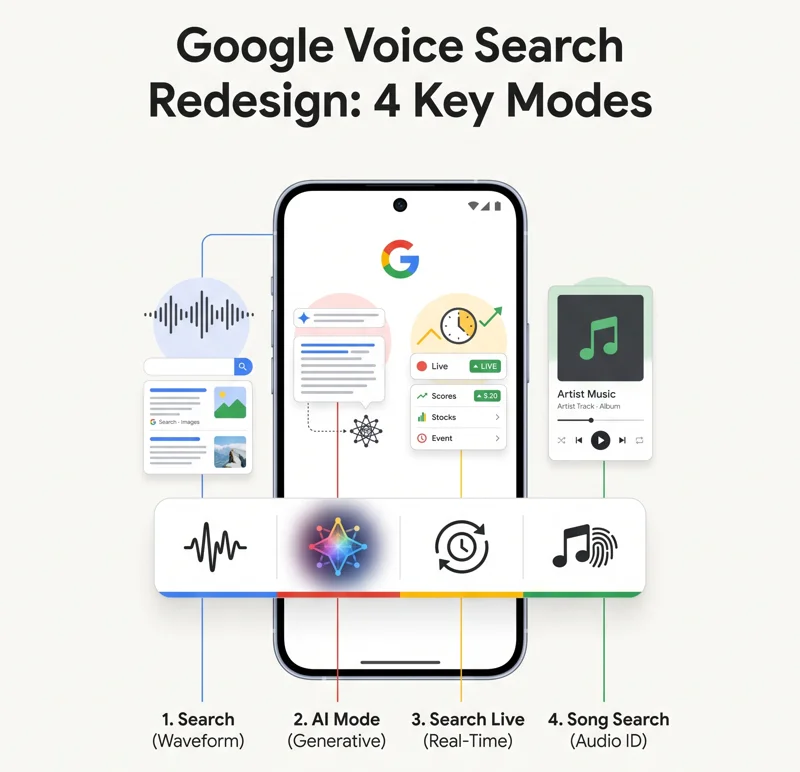
With the new Google voice Search redesign, Google adopts a sleek toolbar interface inspired by the popular Google Lens layout.
A convenient mode-switcher bar now anchors at the bottom of the screen, allowing users to swipe seamlessly between four distinct tools.
These primary modes include standard Search, AI Mode, Search Live, and the legacy Song Search utility.
“By unifying Search, AI Mode, Search Live, and Song Search into a cohesive bottom bar, Google is shifting mobile voice search from simple speech-to-text toward an interactive AI assistant.”
This structural change reduces UI friction and brings complex AI capabilities to the forefront of Android homescreens.
Feature Aspect
Previous Interface
Redesigned Interface (2026)
Layout Design
Basic overlay window
Google Lens-style bottom toolbar
Visual Indicator
Pulsing microphone icon
Dynamic four-bar waveform visualizer
AI Integration
Separate Gemini or Assistant app
Native AI Mode and Search Live tabs
Mode Persistence
Resets to default every time
Remembers your last used search mode
Key Features Included in the Google voice Search redesign
The centerpiece of this update is the addition of advanced AI workflows directly accessible via voice input.
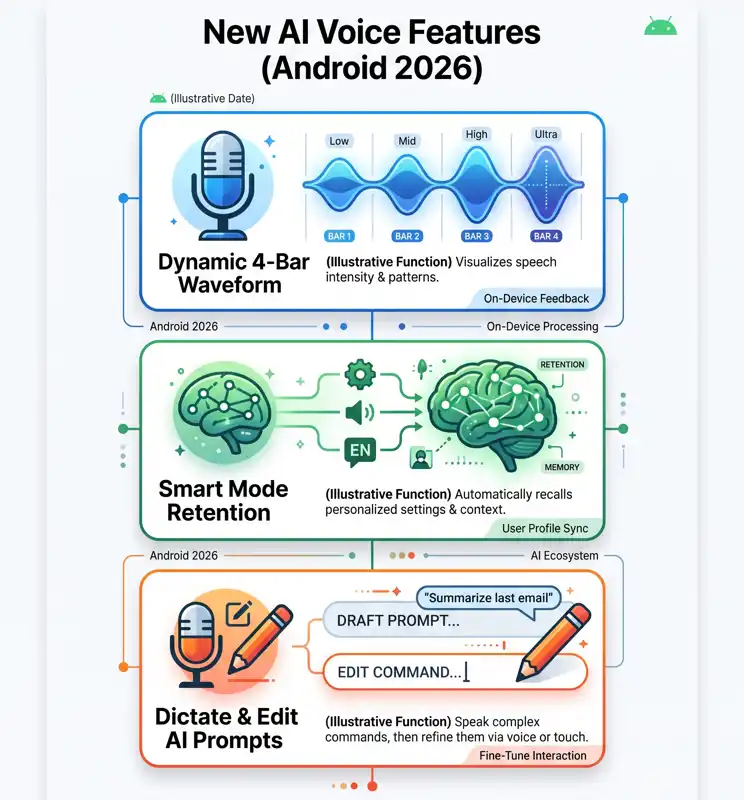
When selecting the standard Search tab, users are greeted with a stylish four-bar waveform visualizer that dynamically reacts to their voice.
A real-time text transcription appears gracefully at the top of the screen as you speak your query.
If you switch over to AI Mode, the voice interface allows you to dictate complex prompts for conversational reasoning.
Tapping the forward arrow executes your AI query, while tapping the stop button immediately dumps the transcript into a text box for further manual editing.
Meanwhile, the Search Live option provides a continuous back-and-forth conversational channel for complex problem solving.
You can learn more about official Android software developments on the official Google Newsroom Portal.
Smarter Memory in the Google voice Search redesign
One of the most practical quality-of-life additions in this update is automatic mode retention.
The system now remembers which search mode you used during your previous interaction.
For example, if you frequently rely on AI Mode for work, the interface will automatically launch into AI Mode next time you tap the widget microphone.
“The addition of smart mode retention ensures users do not have to re-select AI Mode or Search Live every single time they tap the search widget.”
This persistent behavior significantly speeds up daily search habits for power users.
Toolbar Tab
Primary Function
User Interaction Style
Search
Classic web search queries
Voice dictation with real-time transcript
AI Mode
Generative AI prompts & synthesis
Dictate, review, and edit before submitting
Search Live
Real-time continuous dialogue
Interactive back-and-forth conversation
Song Search
Identify music and ambient audio
Passive listening and song matching
How to Access the Google voice Search redesign Today
As of right now, this revamped voice experience is not yet rolled out to all global Android users.
The update is currently undergoing testing within the latest Google app beta release.
Android enthusiasts looking to test the feature must enroll in the official beta channel through the Google Play Store.
Once updated, simply tap the search widget microphone on your homescreen to see if the new bottom switcher is active on your device.
Google is expected to refine the user interface further based on beta feedback before pushing a general release to all Android devices later this year.
FA
Google voice Search redesign
Q: What is the main change introduced in the Google voice Search redesign?
The main change is a new bottom toolbar that unifies standard Search, AI Mode, Search Live, and Song Search into a single voice interface.
Is the new voice search redesign available on all Android phones right now?
No, the redesign is currently rolling out gradually to users enrolled in the Google app beta program.
How do I access AI Mode in the updated interface?
You simply tap the search widget microphone and swipe to the AI Mode tab on the new bottom toolbar.
Does the new redesign replace the standard Song Search feature?
No, Song Search is fully integrated as a dedicated tab within the new bottom switcher bar.
What happens if I stop speaking during an AI Mode dictation?
You can tap the stop button to load your speech transcript into a standard text box for further manual editing.
Will the search widget remember my preferred mode?
Yes, the new design automatically defaults to the mode you last used, such as Search or AI Mode.
How can I try the Google voice Search redesign early?
You can sign up for the Google app beta channel on the Google Play Store and update to the latest build.
Disclaimer: This article is for informational purposes only. Features, rollout timelines, and interface designs are subject to change based on ongoing beta updates and official Google announcements.


'/%3E%3Cpath%20d='m454%20250-4%204-4-4c-3%203-9%205-9%205l2-5q-9%205-10%203c-1-1%2010-12%2012-26%200-1%203-18-8-13-2%201-4-5%200-7%203-2%2010-1%2011%200q1-2%203-2c2%200%2011%201%2014%206%202%205%202%2014%202%2015q0%2015%208%2027c-1%201-8-2-8-2v3s-7-2-9-4m-12-32c4%2014-9%2031-11%2033%2011%200%2012-10%2015-24l1%201c-2%2011-5%2022-8%2025l7-4%203-22h1l-3%2022%203%203%203-3-1-21h1l1%2021%208%203c-5-8-6-25-6-23h1c2%2012%203%2022%2012%2022-3-3-8-16-7-25q0-12-2-15-6-3-10%202-2%202-5-1c-2-2-1-2-6-4q-7-2-6%205s9-3%2013%205zm7-8q-3%201-1%202%203%200%201-2'/%3E%3C/g%3E%3C/svg%3E)